Start from the symptom
Maytag microwave countertop microwave control panel bubbling.
Bubbles on the control panel of a Maytag countertop microwave are usually the clear protective film that ships over the panel. Lift one corner with a fingernail and peel it off; there may be more than one layer. If the panel still looks raised, book a technician.
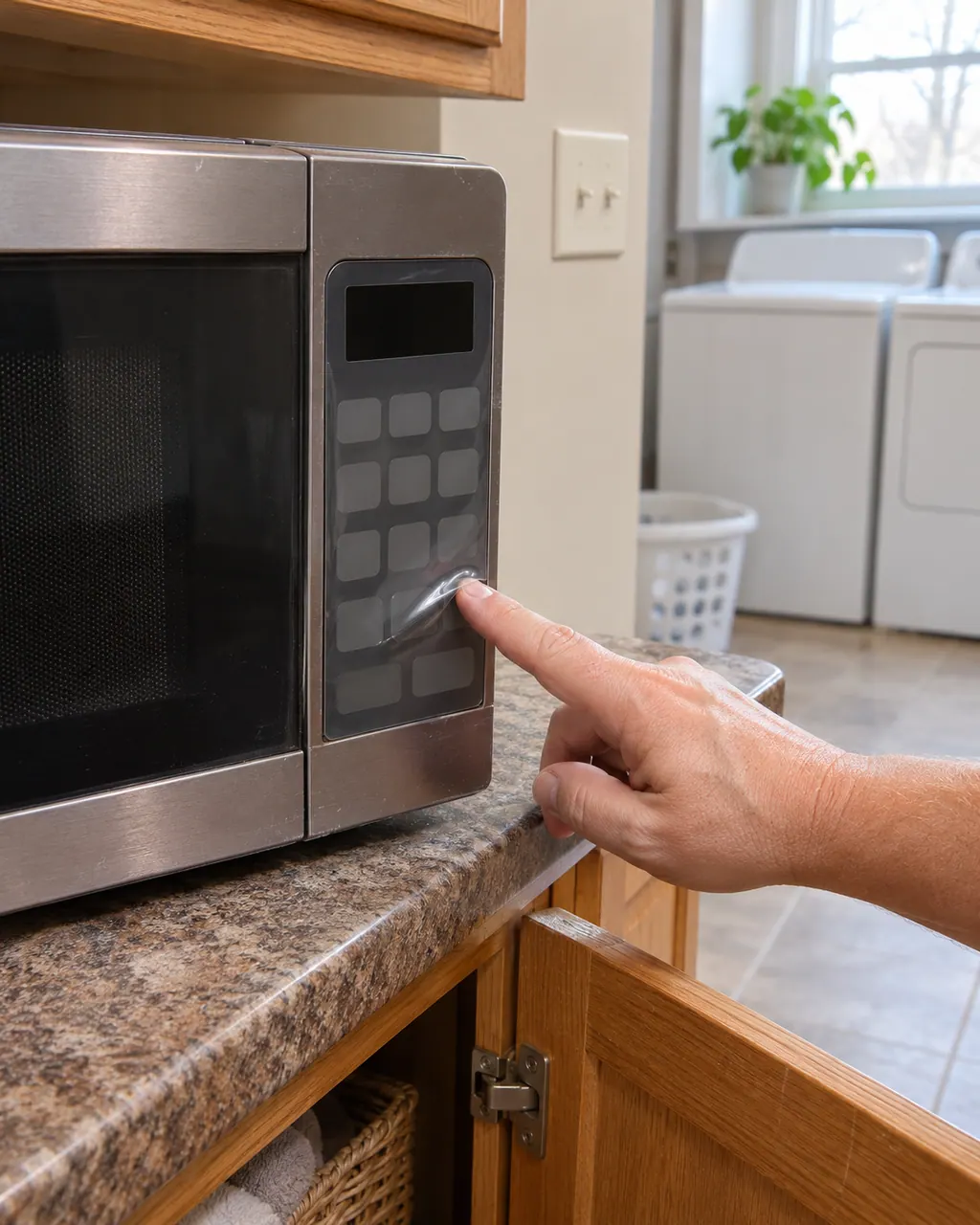
Start with safe observations.
Power the machine down and pull the plug ahead of any check you make yourself. Beware of pooled water and sharp bits of debris. Never handle a wet plug or electrical parts, take off a service panel or go beyond what your model’s owner guide permits.
- 1
Protective film
Look for a clear film over the control panel.
- 2
Peeling
Lift the film at one corner with a fingernail. Pull off every layer.
More about this symptom.
Why is the control panel bubbling?#
The clear protective film may still be on the panel. Product Help lists removing it as the check. 1
How do I remove the film?#
Lift a corner with a fingernail and peel it away. There may be more than one layer, so keep going until the panel is bare. 1
When does bubbling need a technician?#
When the panel still looks raised after every film layer is gone, or the keys stop responding. 1
Systems a technician may investigate.
These parts tie in to the symptom. Noticing it does not prove that any single one has worn out.
If the display adds a code.
This topic has no code of its own.
We have linked no other researched dishwasher code to this topic. Compare the exact message with your model’s manual and do not borrow another code from the library.
See the research statusWhen observation becomes a service request.
Leave internal testing to a technician.
The panel still bubbles or lifts after all film layers are removed.
Keys do not respond on the panel.
Arrange a diagnosticSources and model boundaries.
These sources stand behind the Maytag countertop microwave control panel bubbling advice. Read the manual for your own model.
- Control Panel Bubbling - Countertop Microwave - Product Help | Maytag
Follow the guide for your own model, and see how we research these pages.
What causes bubbles on the control panel?
Product Help asks whether the protective film was removed. The film can cause a bubbled look.
How do I take the film off?
Lift it at one corner with a fingernail.
Could there be more than one layer?
Yes. Product Help notes there may be more than one layer of protective film.
Is the film part of the panel?
No. It is a clear protective film placed on the panel and meant to be removed.
Maytag codes, symptoms, parts and service
From the message to what you do next.
Maytag microwave will not start
If a Maytag microwave will not start, the display usually explains why: a door message, the LOC padlock icon, or Demo Mode. Reopen and reclose the door first, then check the lock and demo settings before you book a visit.
Microwave keypad (SE, F2, F2E1, E03)
On a Maytag over-the-range microwave, SE, F2, F2E1 and E03 all point to the keypad, also called the user interface, or its wiring. Each page prints the same single step: cut power at the breaker for 60 seconds, restore it, wait a minute for a repeat, then run a cycle.
Microwave repair
Book a diagnostic for your model, done at the machine.
Find your metro
Office details, and the entry information to pass along.